QuikNova
Handleiding LED-wekker
LED alarm clock manual
Model VE1127 · slaaptrainer, nachtlampje en witte ruis
Model VE1127 · sleep trainer, night light and white noise
De knoppen
The buttons
Verderop in deze handleiding staat bij elke stap het icoontje van de knop die je moet indrukken.
Throughout this manual, each step shows the icon of the button you need to press.
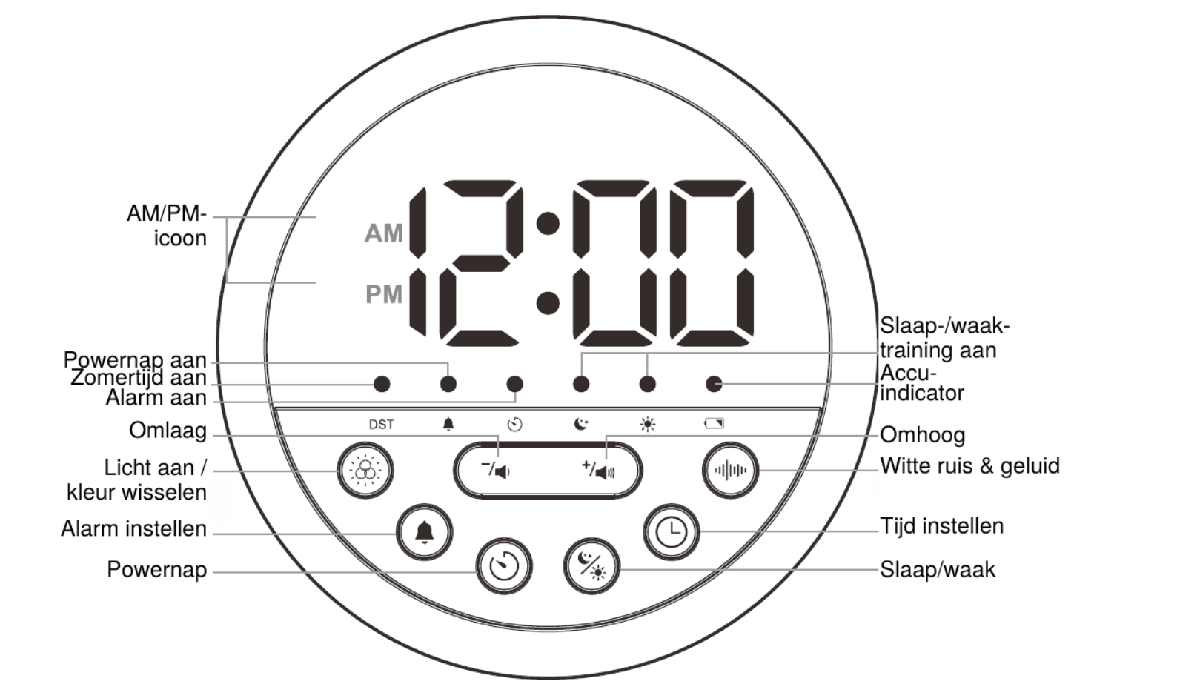
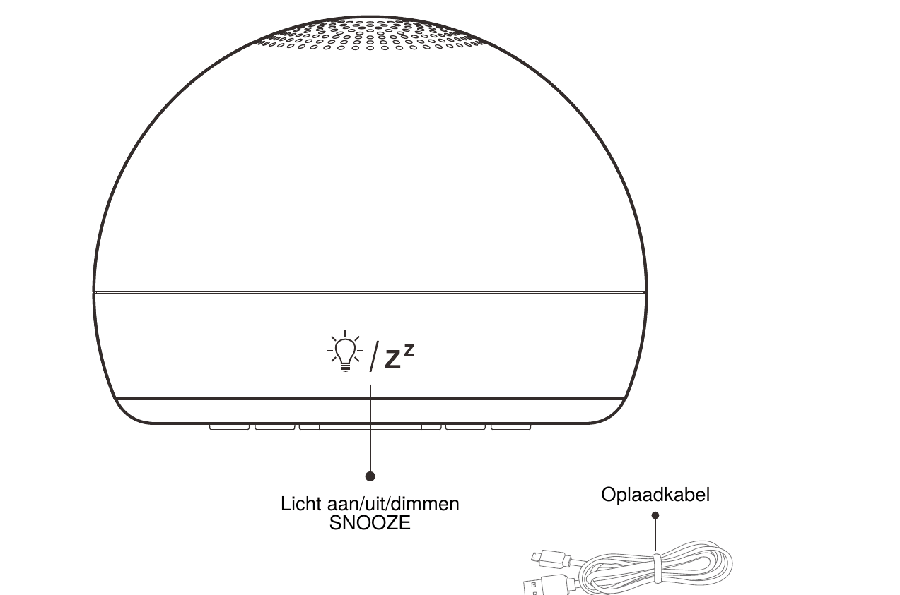
Indicatoren op het display. Van links naar rechts: zomertijd (DST), alarm aan, powernap aan, slaaptrainer aan, wektijd actief en de accu-indicator. Brandt een indicator, dan staat die functie aan.
Display indicators. From left to right: daylight saving (DST), alarm on, power nap on, sleep trainer on, wake phase active, and the battery indicator. A lit indicator means that function is switched on.
Snel starten
Quick start
In drie stappen klaar voor de eerste nacht.
- Steek de USB-kabel in de achterkant van de wekker en het andere uiteinde in een stopcontact met adapter. Het display gaat aan.
- Stel de tijd in. Zie Tijd en display.
- Stel de slaap- en wektijd in en zet de slaaptrainer aan. Zie Slaaptrainer.
Er zit geen stekkeradapter in de doos. Gebruik een USB-adapter van 5V, bijvoorbeeld een telefoonoplader.
Laat de wekker de eerste keer helemaal opladen voordat je hem los van het stopcontact gebruikt. De accu-indicator brandt groen als hij vol is.
Three steps and you are ready for the first night.
- Plug the USB cable into the back of the clock and the other end into a wall socket with an adapter. The display turns on.
- Set the time. See Time and display.
- Set the sleep and wake time and switch the sleep trainer on. See Sleep trainer.
No mains adapter is included. Use a 5V USB adapter, a phone charger for example.
Charge the clock fully the first time before using it away from the socket. The battery indicator turns green when it is full.
Slaaptrainer
Sleep trainer
Je kind ziet aan de kleur of het nog moet slapen of al op mag staan. Klok lezen is niet nodig.
Aan en uit zetten
Druk op  . Staat de slaaptrainer aan, dan branden de maan- en de zon-indicator op het display.
Slaap- en wektijd instellen
De volgorde is: slaaptijd uur, slaaptijd minuut, wektijd uur, wektijd minuut.
- Houd ingedrukt. De slaapindicator gaat aan en het uur knippert. Stel het in met
 of
 .
- Druk één keer op en stel de minuten in.
- Druk één keer op . De waakindicator gaat aan en het wekuur knippert. Stel het in.
- Druk één keer op en stel de wekminuten in.
- Druk nog één keer op om op te slaan en te stoppen.
Standaard staat de slaaptijd op 21:00 en de wektijd op 6:00.
Let op: staat de slaaptrainer aan, dan gaat het nachtlampje automatisch uit terwijl je de tijd of de slaaptrainer instelt. Zet het daarna weer aan met  .
Your child sees from the colour whether it is still time to sleep or time to get up. No clock reading needed.
Switching on and off
Press . When the sleep trainer is on, the moon and sun indicators are lit on the display.
Setting the sleep and wake time
The order is: sleep hour, sleep minute, wake hour, wake minute.
- Hold . The sleep indicator lights up and the hour flashes. Set it with or .
- Press once and set the minutes.
- Press once. The wake indicator lights up and the wake hour flashes. Set it.
- Press once and set the wake minutes.
- Press once more to save and exit.
The default sleep time is 21:00 and the default wake time is 6:00.
Note: when the sleep trainer is on, the night light switches off automatically while you set the time or the sleep trainer. Turn it back on afterwards with .
Tijd en display
Time and display
Tijd instellen
De volgorde is: 12- of 24-uursweergave, uur, minuut. De standaardtijd is 0:00 in 24-uursweergave.
- Druk op
 om het display te wekken.
- Houd ingedrukt. De aanduiding 24Hr knippert. Kies met of tussen 12- en 24-uursweergave.
- Druk op . De uren knipperen. Stel ze in.
- Druk op . De minuten knipperen. Stel ze in.
- Druk nog één keer op om op te slaan en te stoppen.
Gebruik je de 12-uursweergave, let dan goed op AM of PM op het display.
Helderheid van het display
Druk kort op om te wisselen tussen de drie standen.
Waarom het display uitgaat
Op accu gaat het display na 16 seconden uit om stroom te sparen. Druk op een willekeurige knop behalve om de tijd te zien.
Op netstroom staat het display altijd aan van 6:00 tot 21:59 en in spaarstand van 22:00 tot 5:59.
Let op: alle instellingen werken alleen als het display aan is. Wek het eerst met een willekeurige knop behalve , en stel daarna pas in. Raak niet aan terwijl je iets anders instelt.
Klok uitzetten
Houd en samen 3 seconden ingedrukt. De tijd springt dan terug naar 0:00 in 24-uursweergave.
Setting the time
The order is: 12- or 24-hour format, hour, minute. The default time is 0:00 in 24-hour format.
- Press to wake the display.
- Hold . The 24Hr indicator flashes. Choose between 12- and 24-hour format with or .
- Press . The hours flash. Set them.
- Press . The minutes flash. Set them.
- Press once more to save and exit.
If you use the 12-hour format, watch the AM and PM indicator on the display.
Display brightness
Briefly press to cycle through the three levels.
Why the display goes dark
On battery the display switches off after 16 seconds to save power. Press any button except to see the time.
On mains power the display stays on from 6:00 to 21:59 and enters power-save mode from 22:00 to 5:59.
Note: every setting only works while the display is on. Wake it first with any button except , then make your setting. Do not touch while setting something else.
Turning the clock off
Hold and together for 3 seconds. The time then returns to 0:00 in 24-hour format.
Alarm
Alarm
Aan en uit zetten
Druk op  . Staat het alarm aan, dan brandt de alarmindicator op het display.
Alarmtijd instellen
De volgorde is: uur, minuut, wekgeluid. Standaard staat het alarm op 6:00.
- Houd ingedrukt. De uren knipperen. Stel ze in met of .
- Druk op . De minuten knipperen. Stel ze in.
- Druk op . Sd01 knippert. Kies een wekgeluid uit Sd01 tot Sd04. Standaard is dat BIBI.
- Druk op om op te slaan en te stoppen.
Gebruik je de 12-uursweergave, zet het uur dan op de juiste AM- of PM-tijd en controleer de indicator op het display. Anders gaat het alarm twaalf uur te vroeg of te laat af.
Snooze
Druk op terwijl het alarm gaat. Het alarm stopt en gaat na 5 minuten opnieuw af.
Alarm uitzetten
Druk tijdens het alarm of tijdens de snooze op een willekeurige knop behalve . Het alarm stopt en gaat de volgende dag op dezelfde tijd weer af.
Switching on and off
Press . When the alarm is on, the alarm indicator is lit on the display.
Setting the alarm time
The order is: hour, minute, alarm sound. The default alarm time is 6:00.
- Hold . The hours flash. Set them with or .
- Press . The minutes flash. Set them.
- Press . Sd01 flashes. Choose an alarm sound from Sd01 to Sd04. The default is BIBI.
- Press to save and exit.
If you use the 12-hour format, set the hour to the correct AM or PM time and check the indicator on the display. Otherwise the alarm sounds twelve hours early or late.
Snooze
Press while the alarm is sounding. It stops and sounds again after 5 minutes.
Turning the alarm off
During the alarm or the snooze, press any button except . The alarm stops and sounds again at the same time the next day.
Nachtlampje
Night light
Aan en uit
Druk op  of op om het licht aan te zetten. Met zet je het weer uit.
Kleur kiezen
Druk op om door de kleuren te lopen: wit, geel, lichtblauw, donkerblauw, paars, roze, rood, oranje, lichtgroen en tot slot een stand waarin de kleur langzaam blijft wisselen.
Helderheid
Houd ingedrukt om het licht feller of juist zachter te maken.
Lichttimer
- Houd ingedrukt. Het display knippert met de ingestelde tijd. Standaard staat die op ON, dus het licht blijft aan.
- Kies met of : ON, 15, 30, 45 of 60 minuten. Je keuze wordt onthouden en is de volgende keer de standaard.
Wil je het licht eerder uit, druk dan op .
Let op: is de accu bijna leeg, dan brandt de accu-indicator rood en werkt het licht niet. Laad de wekker eerst op.
On and off
Press or to turn the light on. Press to turn it off.
Choosing a colour
Press to cycle through the colours: white, yellow, light blue, dark blue, purple, pink, red, orange, light green, and finally a mode in which the colour keeps shifting slowly.
Brightness
Hold to make the light brighter or softer.
Light timer
- Hold . The display flashes the set duration. The default is ON, which keeps the light on.
- Choose with or : ON, 15, 30, 45 or 60 minutes. Your choice is remembered and becomes the default next time.
To switch the light off sooner, press .
Note: when the battery is low the battery indicator is red and the light will not work. Charge the clock first.
Witte ruis en geluid
White noise and sound
Er zijn elf geluiden: vijf melodieën (Sd01 tot Sd05) en zes soorten witte ruis (Sd06 tot Sd11).
- Druk op
 om het geluid aan of uit te zetten.
- Regel het volume tijdens het afspelen met of .
- Houd ingedrukt om een geluid te kiezen. Knippert Sd01, kies dan met of .
- Druk weer op . Het display knippert met de timer, standaard ON. Kies ON, 15, 30, 45 of 60 minuten. Je keuze wordt onthouden.
- Druk op om op te slaan en te stoppen.
Let op: het geluid stopt zodra je het alarm instelt, en ook als het alarm of de powernaptimer afloopt. Zet het daarna zo nodig weer aan.
There are eleven sounds: five melodies (Sd01 to Sd05) and six kinds of white noise (Sd06 to Sd11).
- Press to turn the sound on or off.
- Adjust the volume while it plays with or .
- Hold to choose a sound. When Sd01 flashes, choose with or .
- Press again. The display flashes the timer, ON by default. Choose ON, 15, 30, 45 or 60 minutes. Your choice is remembered.
- Press to save and exit.
Note: the sound stops as soon as you set the alarm, and also when the alarm or the power nap timer goes off. Turn it back on afterwards if you want it.
Powernaptimer
Power nap timer
Een aflopende timer voor een dutje overdag, los van het gewone alarm.
Druk op  om de timer aan of uit te zetten. Staat hij aan, dan brandt de powernap-indicator op het display.
- Houd ingedrukt om de timer te starten. Het display knippert met de ingestelde tijd, standaard 15 minuten.
- Kies met of : 15, 30, 45 of 60 minuten. Je keuze wordt onthouden.
- Gaat de timer af, druk dan op een willekeurige knop behalve om het geluid te stoppen. Druk op voor snooze: de timer gaat na 5 minuten weer af.
A countdown timer for a daytime nap, separate from the regular alarm.
Press to turn the timer on or off. When it is on, the power nap indicator is lit on the display.
- Hold to start the timer. The display flashes the set duration, 15 minutes by default.
- Choose with or : 15, 30, 45 or 60 minutes. Your choice is remembered.
- When the timer goes off, press any button except to stop the sound. Press to snooze: the timer goes off again after 5 minutes.
Zomertijd (DST)
Daylight saving time (DST)
Houd 3 seconden ingedrukt om de zomertijd aan of uit te zetten. Dit werkt alleen als er geen muziek speelt.
- Gaat de DST-indicator aan, dan gaat de tijd automatisch 1 uur vooruit.
- Gaat de DST-indicator uit, dan gaat de tijd automatisch 1 uur terug.
Hold for 3 seconds to turn daylight saving on or off. This only works while no music is playing.
- When the DST indicator turns on, the time moves forward by 1 hour.
- When the DST indicator turns off, the time moves back by 1 hour.
Opladen
Charging
De wekker heeft een ingebouwde lithiumaccu van 1200 mAh. Je kunt hem gebruiken en opladen via de meegeleverde USB-kabel met een adapter van 5V.
| Rode indicator | Accu bijna leeg, opladen |
| Gele indicator | Aan het opladen |
| Groene indicator | Volledig opgeladen |
Gebruik je de wekker terwijl hij oplaadt, dan kan de indicator wisselen tussen geel en groen. Dat is normaal.
The clock has a built-in 1200 mAh lithium battery. You can use and charge it with the supplied USB cable and a 5V adapter.
| Red indicator | Battery low, charge it |
| Yellow indicator | Charging |
| Green indicator | Fully charged |
If you use the clock while it charges, the indicator may alternate between yellow and green. That is normal.
Probleemoplossing
Troubleshooting
Het nachtlampje gaat niet aan
De accu is bijna leeg. De indicator brandt dan rood en het licht werkt niet. Laad de wekker op met een USB-adapter van 5V.
Het display is donker
Op accu gaat het display na 16 seconden uit om stroom te sparen. Druk op een willekeurige knop behalve om het te wekken.
Het alarm gaat niet af
Controleer of de alarmindicator op het display brandt. Gebruik je de 12-uursweergave, controleer dan of het alarm op AM of op PM staat.
Het geluid stopt vanzelf
De timer staat op 15, 30, 45 of 60 minuten. Zet de timer op ON als je wilt dat het geluid blijft spelen.
De klok loopt precies een uur voor of achter
De zomertijd staat aan terwijl hij uit moet staan, of andersom. Houd 3 seconden ingedrukt om dit te wijzigen.
Het licht gaat vanzelf uit als ik iets instel
Dat hoort zo. Staat de slaaptrainer aan, dan gaat het nachtlampje uit terwijl je de tijd of de slaaptrainer instelt. Zet het daarna weer aan met .
Het apparaat reageert nergens meer op
Houd en samen 3 seconden ingedrukt om de klok uit te zetten. Sluit daarna de USB-kabel weer aan en stel de tijd opnieuw in.
De accu-indicator wisselt tussen geel en groen
Dat gebeurt als je de wekker gebruikt terwijl hij oplaadt. Er is niets mis.
Staat je probleem er niet bij? Neem contact met ons op voordat je het apparaat terugstuurt. Onze gegevens staan onderaan.
The night light will not turn on
The battery is low. The indicator is red and the light will not work. Charge the clock with a 5V USB adapter.
The display is dark
On battery the display switches off after 16 seconds to save power. Press any button except to wake it.
The alarm does not sound
Check that the alarm indicator is lit on the display. If you use the 12-hour format, check whether the alarm is set to AM or PM.
The sound stops by itself
The timer is set to 15, 30, 45 or 60 minutes. Set the timer to ON if you want the sound to keep playing.
The clock is exactly one hour out
Daylight saving is on when it should be off, or the other way round. Hold for 3 seconds to change it.
The light turns off by itself when I change a setting
That is intended. When the sleep trainer is on, the night light switches off while you set the time or the sleep trainer. Turn it back on with .
The clock does not respond at all
Hold and together for 3 seconds to switch the clock off. Then reconnect the USB cable and set the time again.
The battery indicator alternates between yellow and green
That happens when you use the clock while it charges. Nothing is wrong.
Not listed here? Contact us before returning the product. Our details are at the bottom.
Veiligheid
Safety
Algemeen
- Gebruik het apparaat alleen binnenshuis, in een droge ruimte.
- Laat kinderen het apparaat alleen gebruiken onder toezicht van een volwassene.
- Houd de kabel buiten bereik van kinderen. Een kabel om de nek kan verstikking veroorzaken.
- Open het apparaat niet. Er zitten geen onderdelen in die je zelf kunt vervangen.
- Gebruik het apparaat niet als de behuizing of de kabel beschadigd is.
- Kijk niet langdurig van dichtbij in het lampje.
Accu en opladen
- Laad het apparaat alleen op met een USB-adapter van 5V.
- Laad niet op onder een deken, een kussen of ander materiaal dat warmte vasthoudt.
- Stel het apparaat niet bloot aan hitte, open vuur of direct zonlicht.
- De accu is ingebouwd. Probeer hem niet zelf te verwijderen of te vervangen.
- Werkt het apparaat niet meer goed of raakt het beschadigd, stop dan met opladen en neem contact met ons op.
Water en schoonmaken
- Dompel het apparaat niet onder en houd het uit de buurt van water.
- Maak het schoon met een licht vochtige doek. Gebruik geen schoonmaakmiddelen of oplosmiddelen.
General
- Use the device indoors only, in a dry room.
- Children should use the device only under adult supervision.
- Keep the cable out of reach of children. A cable around the neck can cause strangulation.
- Do not open the device. It contains no user-replaceable parts.
- Do not use the device if the housing or the cable is damaged.
- Do not look into the light from close by for long periods.
Battery and charging
- Charge the device only with a 5V USB adapter.
- Do not charge it under a blanket, a pillow or anything else that traps heat.
- Do not expose the device to heat, open flame or direct sunlight.
- The battery is built in. Do not try to remove or replace it yourself.
- If the device stops working properly or becomes damaged, stop charging it and contact us.
Water and cleaning
- Do not immerse the device and keep it away from water.
- Clean it with a slightly damp cloth. Do not use detergents or solvents.
Specificaties
Specifications
| Modelnummer | Model number | VE1127 |
| Materiaal | Material | ABS en stofABS and fabric |
| Afmeting | Size | Ø 10,8 × 8,08 cm |
| Accu | Battery | 1200 mAh lithium, ingebouwd1200 mAh lithium, built in |
| Voeding | Power | DC 5V (USB) |
| Octrooinummer | Patent number | 202530187365.9 |
| Keurmerken | Certifications | CE · UKCA · FCC · RoHS |
In de doos
In the box
- QuikNova LED-wekker (model VE1127)
- USB-oplaadkabel
- QuikNova LED alarm clock (model VE1127)
- USB charging cable
Er wordt geen USB-adapter meegeleverd. Gebruik een adapter van 5V, bijvoorbeeld een telefoonoplader. Ontbreekt er iets of is er iets beschadigd? Neem dan contact met ons op voordat je het apparaat gebruikt.
No USB adapter is included. Use a 5V adapter, a phone charger for example. Is something missing or damaged? Contact us before using the device.
Afvoeren en recycling
Disposal and recycling
Het symbool van de doorgekruiste afvalcontainer betekent dat dit apparaat niet bij het gewone huisvuil mag. Lever het in bij een inzamelpunt voor elektrische apparaten of bij de winkel waar je een vergelijkbaar apparaat koopt. In het apparaat zit een vast ingebouwde lithiumaccu. Haal die er niet zelf uit, maar lever het hele apparaat in. Zo wordt de accu veilig verwerkt.
The crossed-out wheelie bin symbol means this device must not go in with normal household waste. Hand it in at a collection point for electrical appliances, or at the shop where you buy a comparable device. The lithium battery is permanently built in. Do not remove it yourself; hand in the whole device so the battery is processed safely.
Even je ervaring delen?
Share your experience?
We zijn een klein Nederlands merk. Een eerlijke review helpt andere ouders kiezen, en ons om het product beter te maken.
We are a small Dutch brand. An honest review helps other parents choose, and helps us improve the product.
Schrijf een review op bol.comWrite a review on bol.comWerkt iets niet zoals het hoort? Mail ons eerst, dan lossen we het op.
Something not working as it should? Email us first and we will sort it out.
Garantie en contact
Warranty and contact
Je hebt recht op de wettelijke garantie. Werkt er iets niet zoals het hoort, neem dan eerst contact met ons op. We kijken dan samen wat er aan de hand is en wat de beste oplossing is.
You are entitled to the statutory warranty. If something does not work as it should, contact us first. We will work out together what is going on and what the best solution is.
| Quiknova@outlook.com | ||
| Adres | Address | Klingelbeek, 7339 LB Ugchelen, Nederland |
| KvK-nummer | Chamber of Commerce | 98663208 |
Zet je bestelnummer in de mail, dan kunnen we sneller helpen. We reageren meestal binnen één werkdag.
Include your order number in your email so we can help faster. We usually reply within one working day.